FormHaven document preparation company
Lentara
Company page - document tools, signing, CRM, and blueprint logic

See how Lentara turns public intake into document-ready work.

Lentara connects public document tools, secure packet portals, CRM case rooms, form-filling logic, and Lentara Sign. The goal is simple: let documents create the field truth, show what is missing, and move the work into review, signature, or delivery with fewer handoffs.

Public tools that prove value Visitors can scan, search, and compare before they share a file or create an account.
Secure signing chamber Lentara Sign gives prepared documents a review room, signer checklist, session record, and final signature step.
Loginless packet portals Private links and passkey-ready return access reduce usernames, passwords, and portal fatigue.
Human-confirmed execution AI can extract, suggest, and draft. People still confirm outbound actions, signatures, and delivery.
The public page stays simple. This page shows the connected business system behind it: document intake, Office/form-fill logic, CRM case rooms, secure signing, and reusable blueprint packs.
Company view - separate shells, one core
Public intake shows value before contact
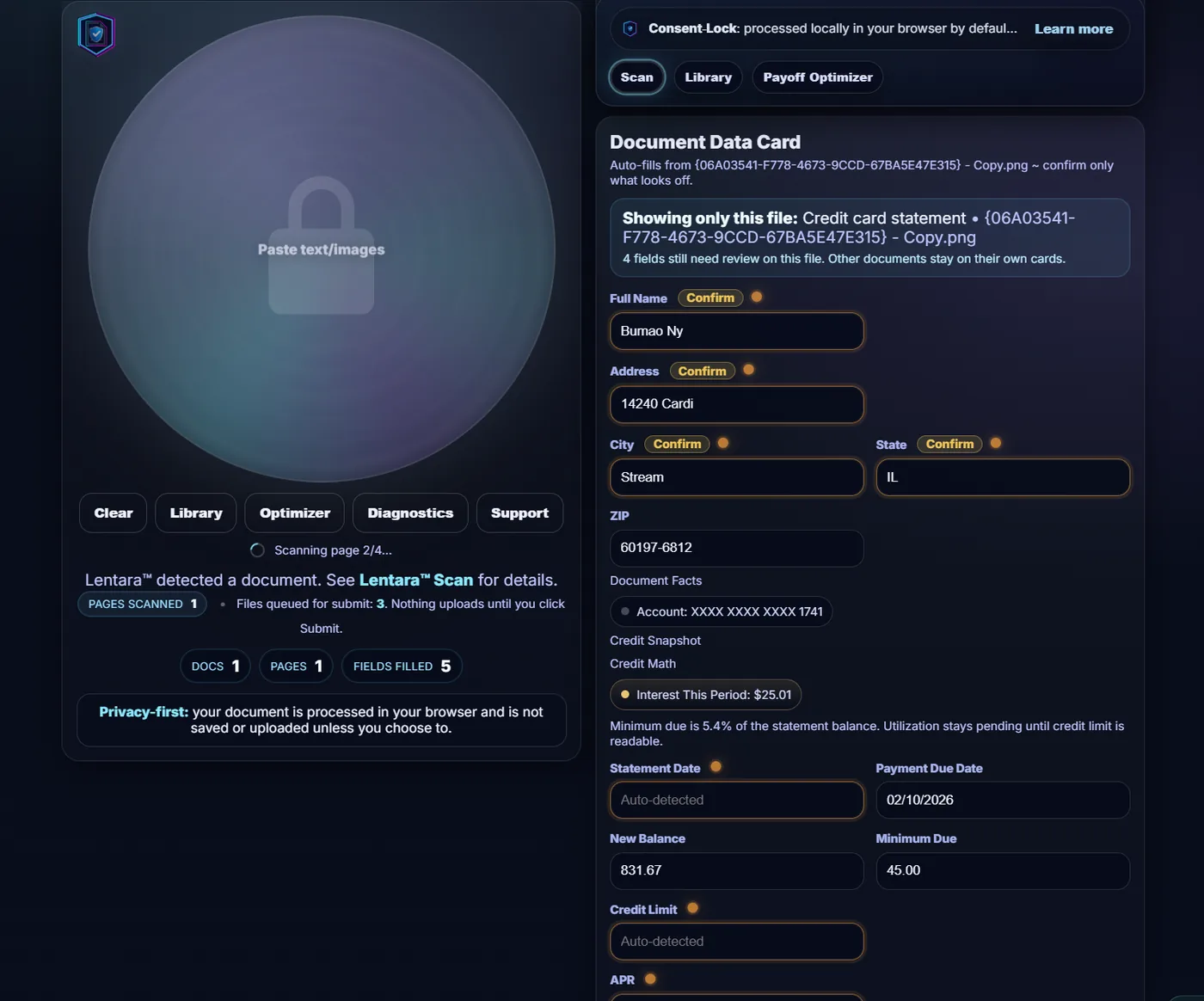
Lentara scan and document data card interface
Lead shell

Public visitors can see value before a business conversation starts.

The public lane can scan, extract, and preview next steps locally. That makes the eventual business conversation stronger because the product already proved something useful.

1
Lead with utilityThe product demonstrates real extraction before it asks for contact.
2
Trust through postureLocal-first default makes the first interaction feel safer.
3
Clear handoffOnce public value is clear, the company story can pick up without confusing the first-time visitor.
Public utility first. Company workflow second.

FormHaven is where the workflow is proven

FormHaven is the document preparation company behind Lentara. It gives the software a real service lane where packet logic, form filling, secure delivery, and client follow-up can be tested against live work before the same patterns expand into more industries.
01

Live proof of work

The product is not being designed in a vacuum. FormHaven is the working lane that proves which document flows deserve to become stable software.

Real packetsReal handoffs

02

Direct service grows carefully

More document-prep flows can move in-house over time, including tax-prep-oriented lanes on a smaller scale as the logic becomes reliable enough to support them.

Selective expansionTax lanes
03

Stable shell, reusable software

FormHaven is the proving ground, but the point is bigger than one company. Lentara's stable shell can carry the same operating rhythm into other industries as packs mature.

Stable shellMore industries
04

Cleaner buyer story

That is why this page exists: to show buyers and evaluators how the public lane, FormHaven service work, and company software story connect without confusing public visitors.

Buyer claritySeparate lanes

Why the software feels different

Lentara is not trying to look like another generic dashboard. It keeps the important document facts, missing items, evidence, and next action close together so people can work faster without losing control.

Built for long document sessions

As AI adds more extraction, recommendations, and automation, the human side of the workflow needs a calmer surface. Lentara keeps status, gaps, supporting evidence, and next actions in one operating layer instead of scattering them across tabs.

Clear statusCase roomHuman confirmsStable shell
01

Dense, calm work surfaces

The interface is designed to show more useful context in less space without taking away the person's bearings.

02

Case-room rhythm

Status, gaps, evidence, and next actions belong together like a cockpit, not scattered across tabs, drawers, and disconnected pages.

03

Dark-first long-session focus

Low glare, professional calm, and focus-minded contrast help the product stay usable through long review sessions and dense packet work.

04

Pills in their pixels

Every chip, pill, and badge must earn its place. If it does not help the next decision, it should not be occupying the screen.

05

Intelligent draft systems

Draft logic turns packet context, missing-item checkpoints, and form structure into guided execution instead of leaving the team at a blank page.

06

Stable shell, growing packs

The shell stays familiar while pack logic can expand into tax, medical, insurance, legal, mortgage, compliance, and other document-heavy lanes.

Built for document-heavy industries, not one lane

FormHaven proves the first live lane, but the shell is designed to travel into other high-paperwork environments as industry packs mature.
01

Tax + document preparation

Returns, income proof, debt-support packets, and filing context can all benefit from one calmer shell before a draft, submission, or client handoff begins.

TaxPacket prep
02

Medical + patient / claims intake

Medical paperwork, benefits documentation, and EHR-adjacent intake flows all need clearer missing-item logic, attachment context, and human-confirmed routing.

MedicalIntake
03

Insurance + compliance operations

Large review environments need a calmer control surface for supporting evidence, routing suggestions, escalation, and document-aware action sequencing.

InsuranceCompliance
04

Legal + mortgage-lending style packets

Legal and lending workflows often live or die on packet completeness. Lentara’s stable shell can support checklist logic, evidence grouping, and the next clean action.

LegalMortgage

The company side is where documents become work

The CRM and Office surfaces are the proof behind the public product: one focused client, one case room, one field surface, and a clear next move instead of a pile of tabs.
CRM proof - case room

Focused client, working truth, and the next clean move

The CRM view should feel like a working room for the case: who the client is, what is verified, what is missing, which documents support it, and where the work moves next.

1focused client
2missing blockers visible
0extra portals to create
Case Pulse

Action fits inside a compact decision modal

Likely match, missing count, conflicts, notes, and the next move can appear in one bounded chamber. The team sees enough context to act without losing the room.

Operator Home

The worker has a seat, not just a queue

The workspace keeps role, active load, strengths, and team identity visible. That matters when document work becomes AI-assisted but still human-confirmed.
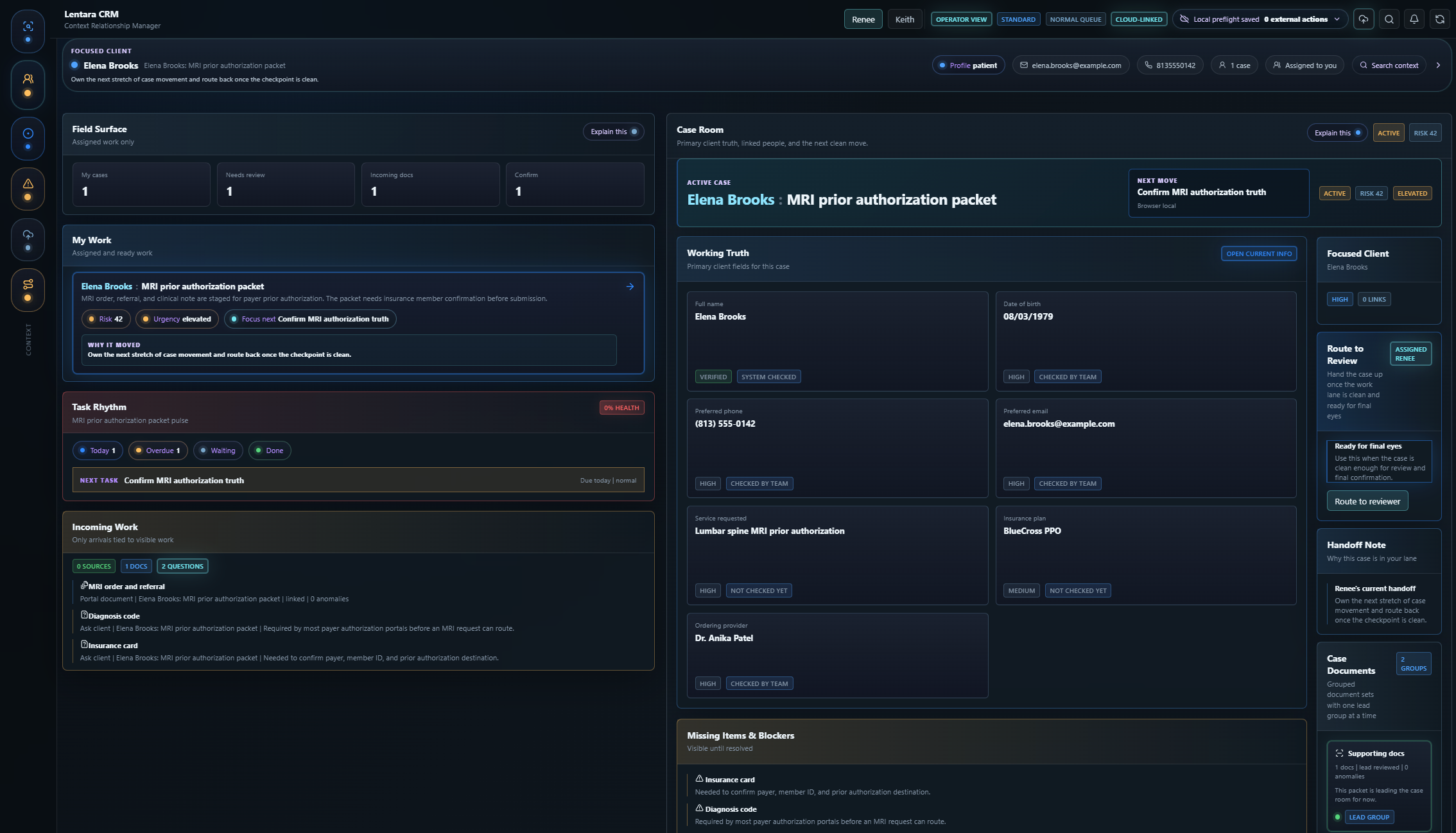
Lentara CRM focused client and case room view
CRM surface

Focused client and case room in one operating layer

The main CRM room keeps field truth, missing blockers, supporting docs, handoff notes, and case status visible without burying the team.
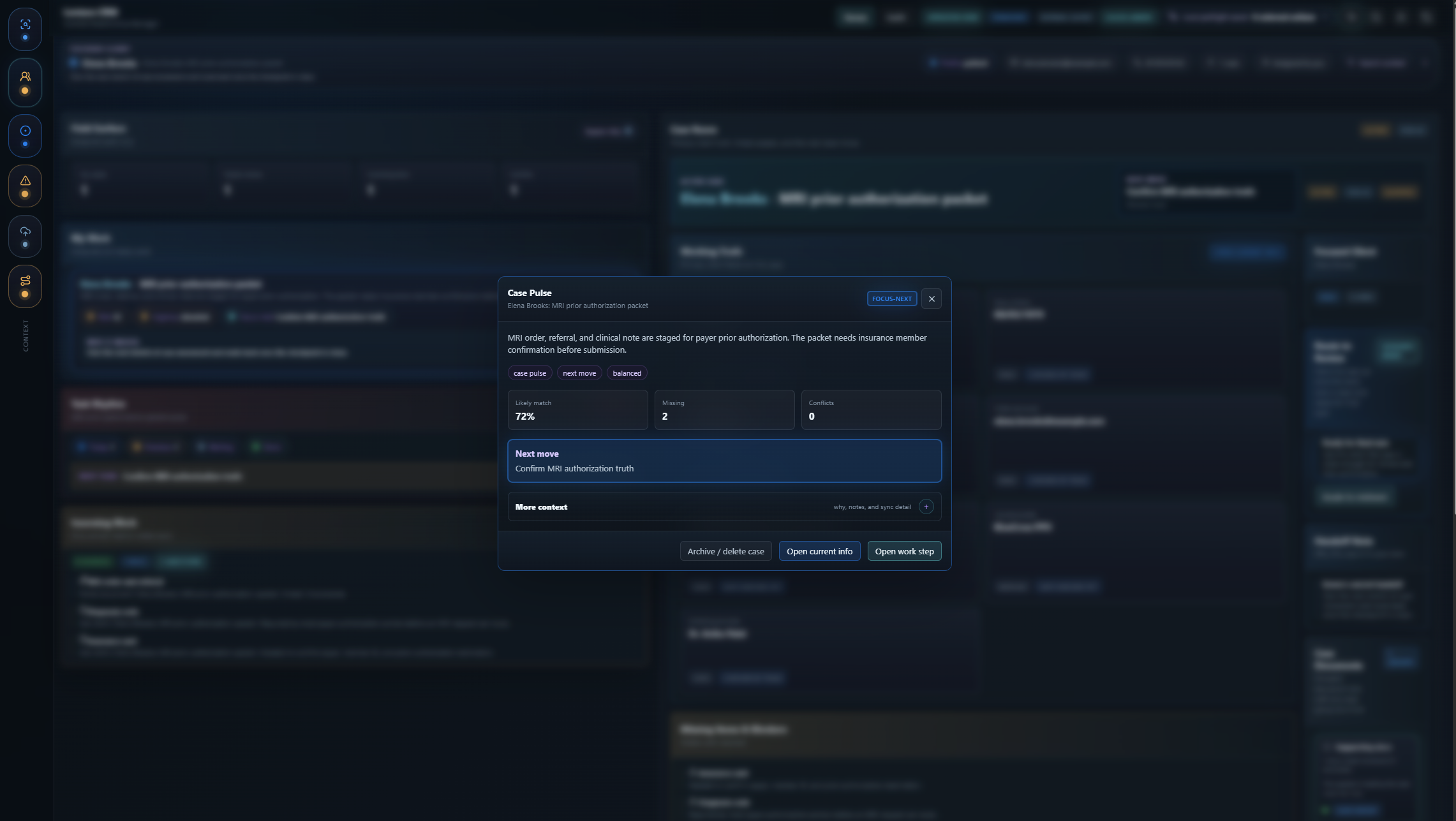
Lentara CRM Case Pulse action modal
Case Pulse

Decision context appears only when action matters

A bounded pulse can show confidence, missing items, conflicts, and the next move while the full room stays in the background.
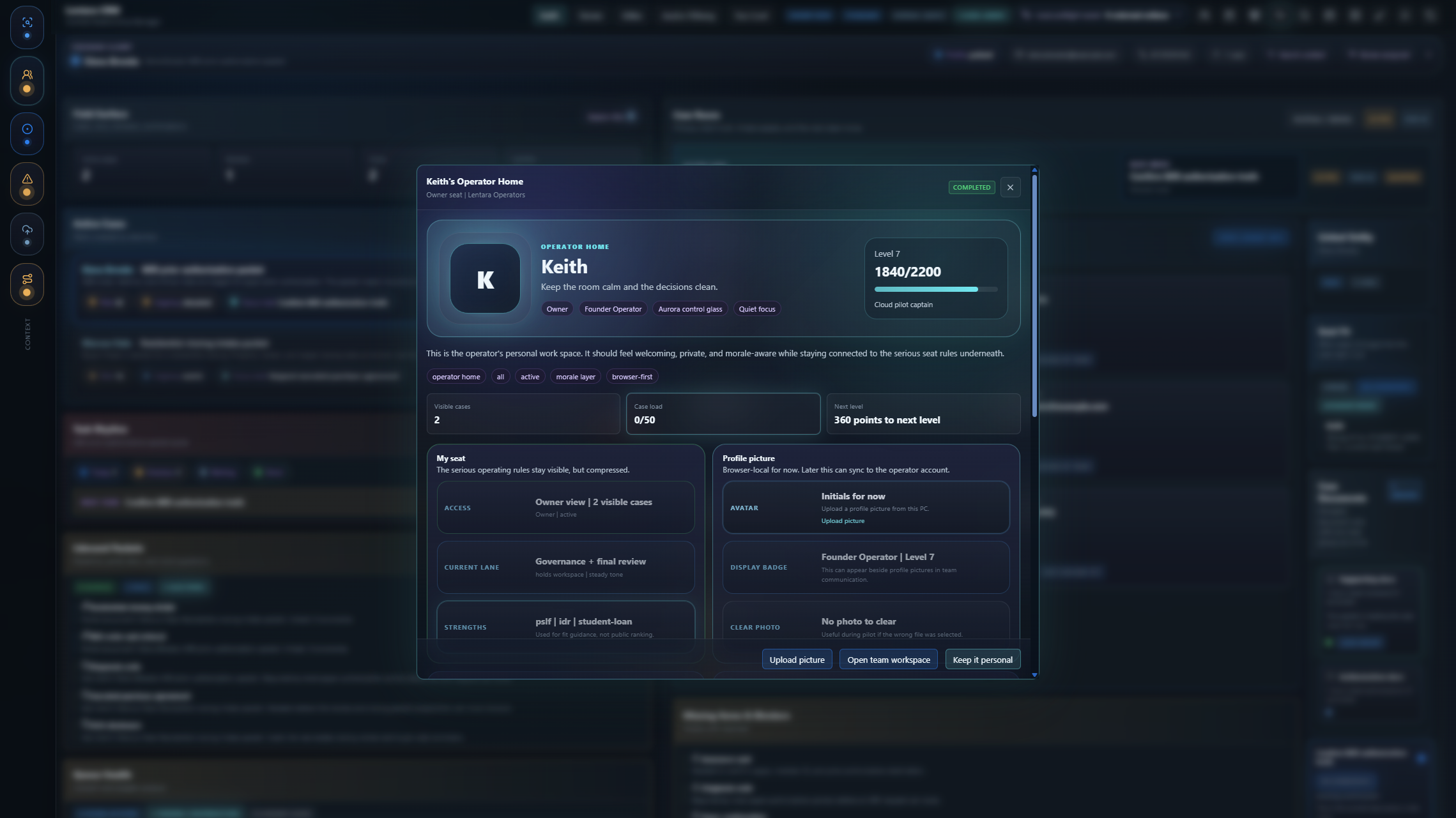
Lentara CRM operator home modal
Operator Home

The team seat has identity, capacity, and lane context

Owner, role, load, strengths, and workspace state become part of the operating surface instead of disappearing into settings.

Lentara Sign makes prepared documents feel finished

Lentara Sign is the secure signing lane for documents prepared by the Office and form-fill side. It is not just a signature pad; it is a review chamber with DocBoss readiness, signer context, session record, and loginless return access.
Secure signing chamber

Review first, then sign with confidence

The signer can see the prepared document, checklist, confidence state, and final review step before the signature happens. That keeps the signature connected to the facts behind the packet.

DocBossreadiness before signature
SessionSealrecord and completion mark
No loginprivate link, passkey-ready access
Signature chamber

The signature is one step in a full session

The signing overlay keeps consent language, signature preview, session mark, and final submit action together instead of treating the document like a loose upload.

Loginless return access

Less username fatigue, more secure re-entry

Instead of asking every client to create another account, the portal can use secure links now and passkey-style device checks as that layer matures. The device handles face, fingerprint, or PIN checks; Lentara does not receive raw biometric data.
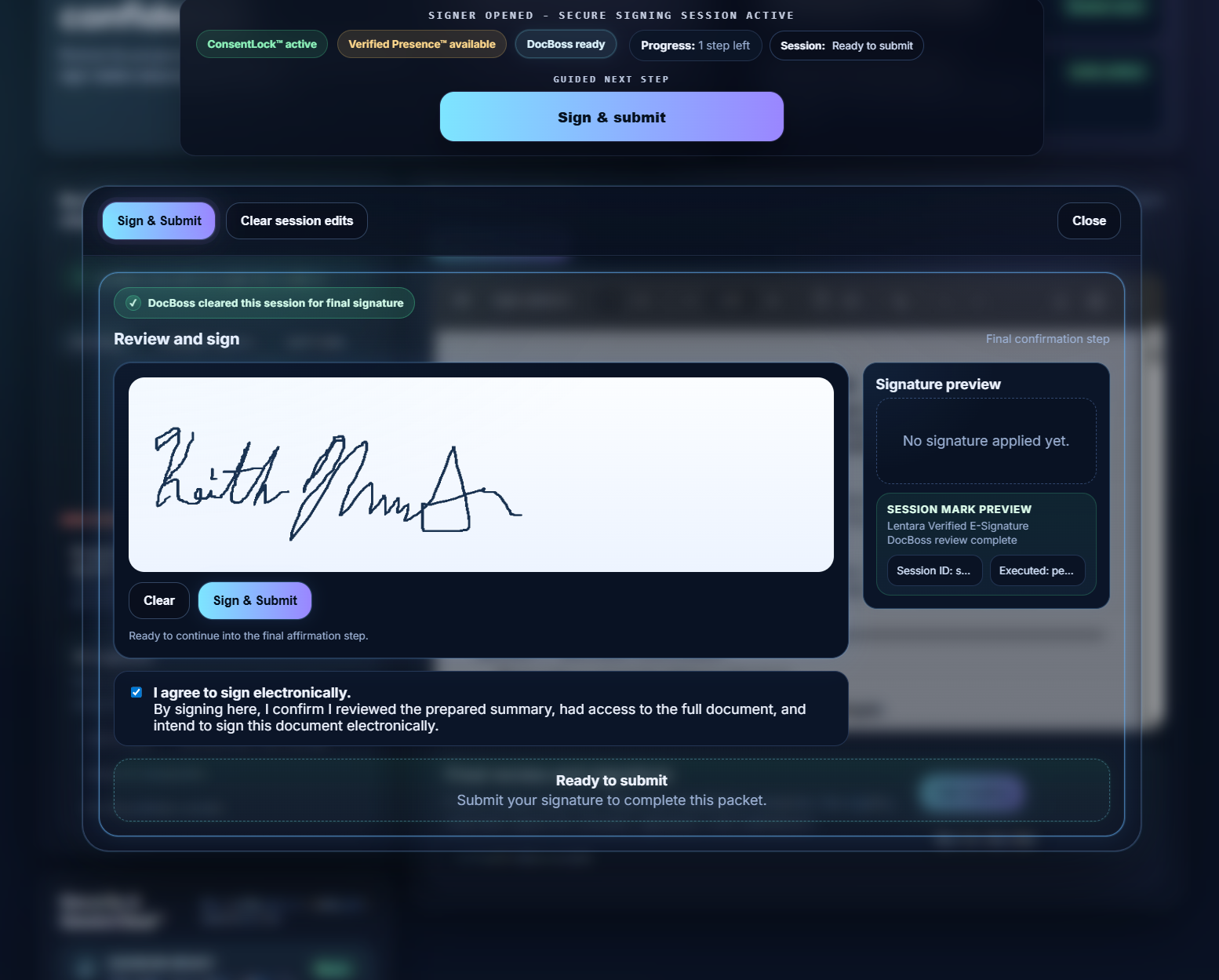
Lentara Sign review room with DocBoss readiness
Review room

Prepared documents get context before the signature

DocBoss readiness, checklist state, document preview, and the final signing path stay in one calm chamber.
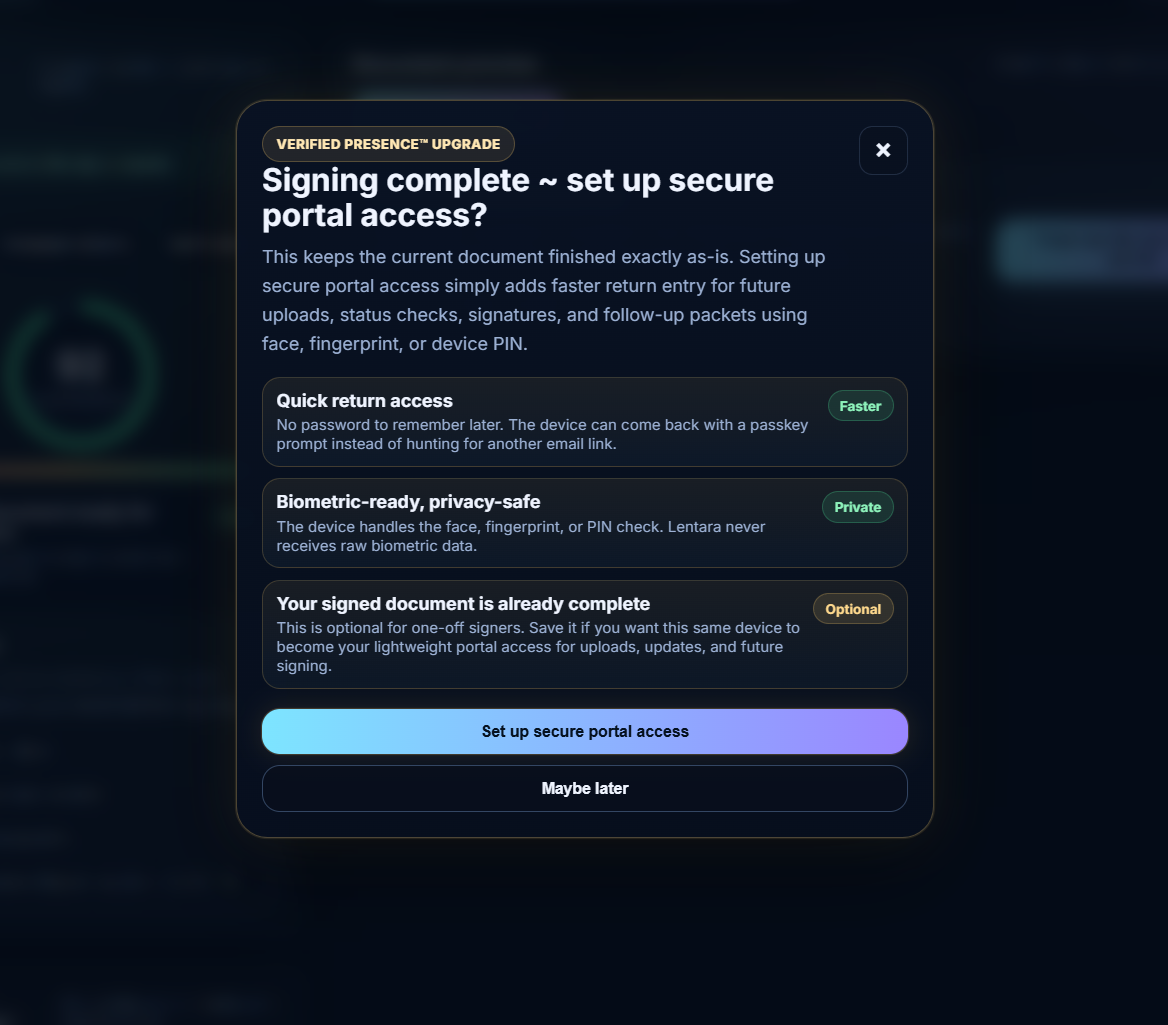
Lentara Sign signature chamber overlay
Signature chamber

Signature capture stays tied to consent and session record

The signer sees the signature, agreement language, session mark, and final submit path together.
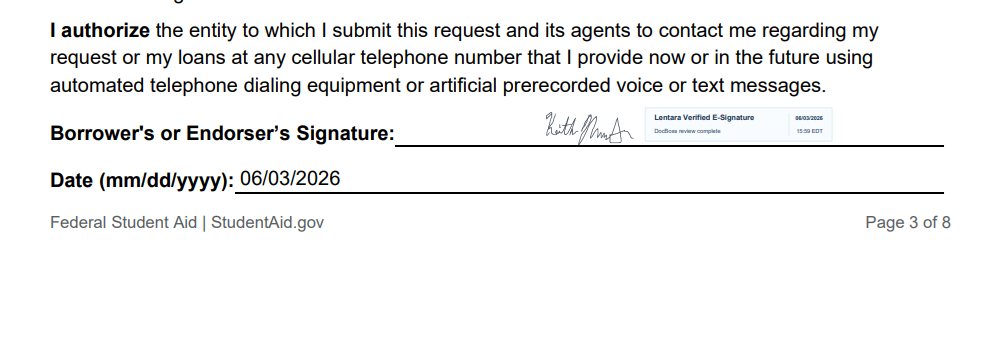
Lentara Sign loginless secure portal access prompt
Return access

Secure portal access without another password wall

For future updates, uploads, status checks, and follow-up packets, return access can become quick, private, and device-friendly.

Blueprint Studio turns a document flow into reusable logic

This is the bridge from FormHaven service work into software: drop a form once, confirm the logic, map fields, test readiness, and reuse that blueprint when the same kind of packet appears again.

Form once, logic forever

Blueprint Studio is the company-side answer to the bigger Lentara promise: documents should do more of the work. The system learns what fields matter, how readiness is judged, and which execution lane should fire only after a human confirms it.
1
Intake + matcherBring in a local scan, match it to a known packet type, and show why that match was selected.
2
Field mapConnect document facts to CRM fields, packet fields, or review questions without rebuilding the workflow each time.
3
Tests + historyRun readiness checks and keep the blueprint explainable as it evolves from service work into reusable software.
4
Consent-gated executionOutbound actions stay blocked until a person confirms the packet is ready to move.
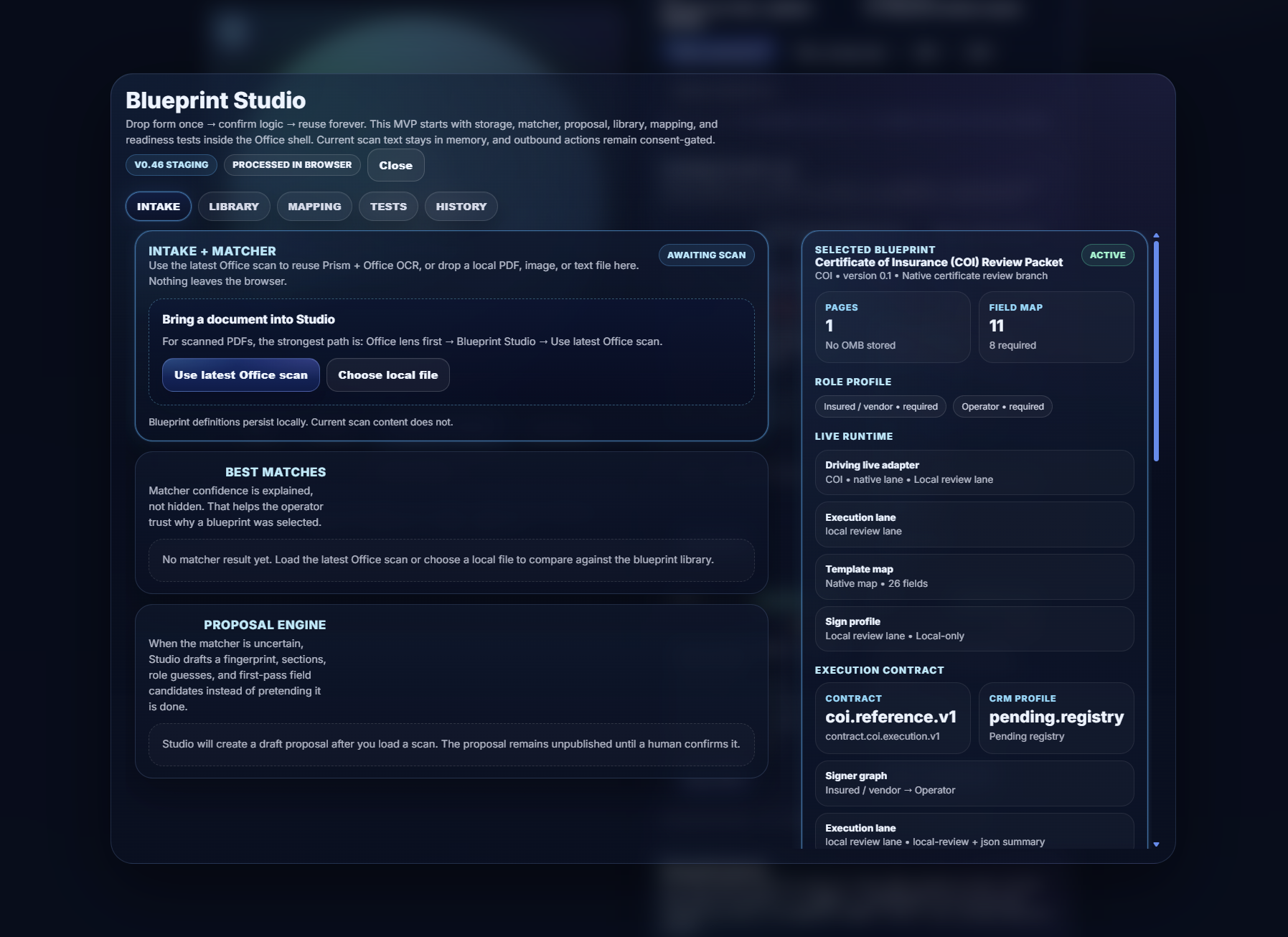
Blueprint Studio intake, matcher, and execution contract view
Blueprint Studio

Document logic becomes a reusable operating contract

The studio view shows the field map, role profile, runtime lane, and execution contract that turns one packet type into repeatable software behavior.

Want to see the business side?

Use the public tools first, then reach out if your team handles document-heavy work and wants to see how intake, CRM case rooms, secure signing, and reusable blueprint logic can connect.

Start with the workflow, not a sales deck

The clearest conversation starts with the documents your team already handles: what comes in, what needs to be extracted, which fields need confirmation, who signs, and where the finished packet goes.